The most useful digital products to sell on Etsy help a specific person complete a specific task. A reading planner for someone rebuilding a reading habit, a household budget spreadsheet for two people sharing bills, or a workbook for a first apartment gives you a clearer starting point than a generic “life planner.”
This guide gives you 12 focused product ideas, a way to compare them, and a checklist for turning one into a usable download. These are starting concepts to research, not a ranking of Etsy bestsellers or a promise of sales.
12 digital product ideas with a clear buyer
Use the examples below to make your idea more concrete. The suggested contents are design recommendations, not claims about what every Stredy export includes. Confirm the actual files and features before writing your listing.
| Product idea | Who it helps | Useful contents |
|---|---|---|
| Reading routine planner | Readers returning after a long break | Weekly reading time, book log, short reflections |
| Shared household budget | Couples or roommates dividing expenses | Income inputs, shared bills, payment summary |
| First-apartment workbook | People furnishing their first home | Room measurements, essentials list, purchase priorities |
| Weekend travel planner | Travelers organizing a short trip | Booking details, packing list, flexible daily plan |
| Small-space reset checklist | People organizing a small home | Room-by-room tasks, donation list, maintenance routine |
| Garden observation journal | New balcony or container gardeners | Plant records, watering observations, seasonal notes |
| Family routine planner | Households coordinating recurring tasks | Weekly overview, responsibility chart, handover notes |
| Hobby project tracker | People juggling several creative projects | Supplies, next action, progress notes, finished-work log |
| Personal savings tracker | People saving for a named purchase | Target, contributions, remaining balance, instructions |
| Everyday meal organizer | Households planning meals and shopping | Meal slots, pantry check, categorized shopping list |
| Creative reflection worksheets | Adults starting a regular journaling practice | Original prompts, worked examples, space to respond |
| Beginner hobby guide | People learning a hobby you understand | Equipment basics, a first project, troubleshooting |
A planner should help someone make a decision
For a reading planner, a blank calendar alone leaves most of the thinking to the buyer. Add prompts that help them choose when to read, notice interruptions, and decide what to change next week. A simple weekly page and a daily reflection can work together without turning the product into an overwhelming binder.
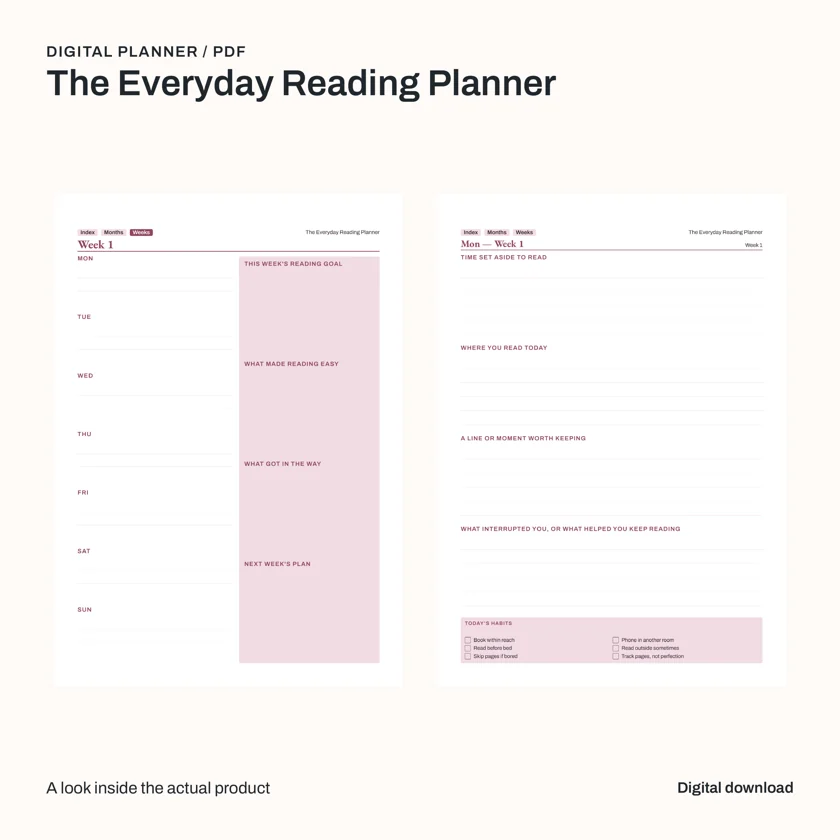
The example below is an actual Stredy reading-planner export. Its weekly page includes a reading goal and a next-week plan. The facing daily page asks what helped or interrupted reading. Those prompts give the layout a purpose beyond decoration.
A spreadsheet should make its assumptions visible
A shared-expense workbook needs to explain the method it uses. Are bills split equally, by income, or using a chosen percentage? Can a buyer see where to enter a payment? Does the summary change when an input changes? A beautiful dashboard is useful only when its numbers are understandable.
Keep the first version focused on recording and calculating. Avoid promises about wealth, investment returns, or debt outcomes. If you advertise Excel and Google Sheets compatibility, test both environments; exporting an XLSX file alone does not establish that compatibility.
A workbook should move the buyer forward
Sequence exercises so each answer helps with the next one. For a first-apartment workbook, measuring a room should come before choosing furniture. Deciding what is essential should come before making a shopping list. Include an example of a useful answer, then leave enough space for the buyer’s own response.
How to choose an idea worth testing
Search demand is one signal. A keyword tool’s volume estimate is not a count of people ready to buy your specific download. Etsy listing counts, shop-wide sales, reviews, and “bestseller” labels also answer different questions. Record what a signal actually measures before drawing a conclusion.
- Write the buyer’s problem. For example: “I want to share bills without losing track of who paid.” Avoid starting with a color palette or an arbitrary page count.
- Search the buyer’s wording. Compare a broad phrase with a specific use case. Look at whether results match the format and audience you intend to serve.
- Study several relevant listings. Note the contents, file types, price positioning, previews, and instructions. Read feedback for recurring confusion or missing features without copying another seller’s work.
- Choose a useful difference. This might be clearer instructions, a smaller scope, more writing space, or a tested calculation. Changing a cover color alone is a weak reason to choose your product.
- Test the first version. Ask someone in the intended audience to complete one real task with it. Observe where they hesitate and repair those points before expanding the package.
Keep a short research note: buyer problem, evidence observed, competing alternatives, your proposed improvement, and the test you will run. This is more useful than labeling every idea “high demand, low competition.”
Choose the format before designing the pages
Use for reading, printing, worksheets, and annotation. Check paper size, writing space, and text size. State whether the file is printable, annotatable, or fillable; those features are different.
XLSX
Use when buyers need to enter values and calculate results. Explain supported software, input cells, formulas, and how to clear sample data.
EPUB
Consider for a text-focused ebook that benefits from reflowing text. Check navigation and images in an ebook reader. Do not assume a writing-based planner is suitable as an ebook.
Stredy’s product types show the main output formats for planners, workbooks, spreadsheets, guides, and ebooks. Choose a format that fits the buyer’s task before adding extra deliverables.
Build an Etsy download that is easy to use
Separate buyer files from your marketing assets. Buyers need the product and instructions. Your cover mockups, listing images, and draft description belong in your seller folder unless they are explicitly part of the offer.
For an instant digital listing, Etsy currently allows up to five uploaded files, with a maximum of 20 MB each. PDF and ZIP are among the supported types. Rename files clearly before uploading because buyers see those names. Check the current Etsy digital-listing instructions when preparing the package.
reading-planner/
  START-HERE.pdf
  Reading-Planner-US-Letter.pdf
  Reading-Planner-A4.pdf
This folder is an example structure. Only include a size you have actually exported and checked. An A4 filename does not make a US Letter file an A4 document. If you supply a ZIP, explain how to extract it and confirm the archive opens successfully.
Put the essential instructions on one short page: what is included, how to open it, how to print or annotate it, and how to contact you for help. Etsy says digital purchases currently need to be downloaded through a browser rather than the Etsy app. A link to Etsy’s download guide can prevent avoidable confusion.
Show the product clearly in the listing
Build a small sequence of images that answers the buyer’s questions in order. Start with the product and its purpose, show a readable interior, explain the contents, then clarify format and use. Use the same colors and typography throughout so the listing feels like one product.
- Main image: product title, a clear preview, and “digital download.” Keep the title readable at thumbnail size.
- Inside view: actual pages or spreadsheet tabs at a readable scale. Do not substitute decorative AI text for the real product.
- Contents view: the verified sections, files, or worksheets included.
- Usage view: show printing, annotation, or entering data only if that use has been checked.
- Requirements view: paper sizes, file types, supported software, and anything the buyer must supply.
A tablet or bound-book mockup can help explain use, but it must not imply that a physical device or printed book is included. Describe the downloadable file in plain language. Avoid claims such as “guaranteed to change your life” or “works in every app.”
Can you use AI to create Etsy digital products?
Etsy’s Creativity Standards allow seller-prompted AI creations and require disclosure in the listing description when an item is created using AI. They also identify AI prompt bundles and collections of someone else’s work as examples that do not qualify as designed by a seller. Review the full policy for your product.
Use AI to help develop your own brief, structure, and design, then inspect the output. Check the wording, facts, images, and practical usefulness. Avoid copying a competitor’s pages, characters, branding, or distinctive artwork. Your listing should represent your finished files accurately.
A final check before you list
- Complete the task the product promises using the actual exported file.
- Inspect every page or worksheet for clipping, small text, missing content, and unexplained sample data.
- Print a representative page if you describe the product as printable.
- Test formulas and blank inputs if the product is a spreadsheet.
- Check filenames, sizes, archive extraction, and download instructions.
- Compare each listing claim and image with the delivered package.
Common questions
What should a beginner make first?
Choose a product whose usefulness you can judge yourself. A focused checklist, reading planner, or hobby worksheet is easier to inspect than a complex financial model or a broad advice ebook. Familiarity with the buyer’s task matters more than the number of pages.
Should I launch a huge bundle?
Start with a complete, coherent offer. Add related files when they help the same buyer achieve the same outcome. More files also mean more instructions, compatibility checks, and potential confusion.
Can Stredy help prepare my listing?
Stredy prepares supported product files and available sales assets, including images, mockups, and listing copy. Review the final package and any supported store draft before publishing. Marketplace approval and sales remain outside Stredy’s control.
Give one useful idea a finished form
Choose an audience and outcome, review the blueprint, and build your first product in Stredy. Download and back up the package within the seven-day storage window.
Start shaping your product →Compare plans and creditsHow this guide was prepared: AI-assisted writing checked against the linked official marketplace guidance and Stredy’s documented outputs. The featured image is AI-generated editorial artwork. Interior product samples show actual Stredy exports. Ideas and examples are illustrative; no sales results are claimed. Stredy publishes this guide and offers a paid product-creation service.