Gumroad digital products work best as clearly explained downloads: a useful file, an honest preview, and instructions that help the buyer get started. If you are launching a planner, workbook, ebook, or spreadsheet, begin by deciding what the customer will do with it after checkout.
This guide walks through choosing an offer, organizing the files, writing a listing, and testing delivery. It uses Stredy’s actual product samples to make the process concrete. The examples show product design and packaging, not verified sales results.
Choose a product with an observable result
Look for a task that can be completed, repeated, or made easier. “Get organized” is broad. “Plan the next week of family activities in one place” suggests a structure you can actually build and test.
| Product | Practical outcome | What to demonstrate |
|---|---|---|
| Reading planner | Make room for a regular reading routine | Weekly planning and reflection pages |
| Shared-expense spreadsheet | Record bills and understand who paid | Inputs, calculation method, payment summary |
| First-apartment workbook | Prioritize furniture and household purchases | A sequence from measurements to essentials |
| Beginner hobby ebook | Complete a first project | Clear instructions, examples, troubleshooting |
| Travel planning pack | Keep trip details together | Bookings, packing, itinerary, notes |
These ideas need audience research before you invest in a full collection. Read the questions people ask about the task, compare existing offers, and check whether you can provide something meaningfully clearer or more useful. Do not mistake a popular topic for proof that your particular download will sell.
Make the inside of the product part of the offer
The Stredy sample below, My First Apartment Choices, starts with room dimensions and then asks the reader to list what they actually need. The prompts connect: measurements provide constraints for the later decisions. Each exercise also explains what a useful answer looks like.
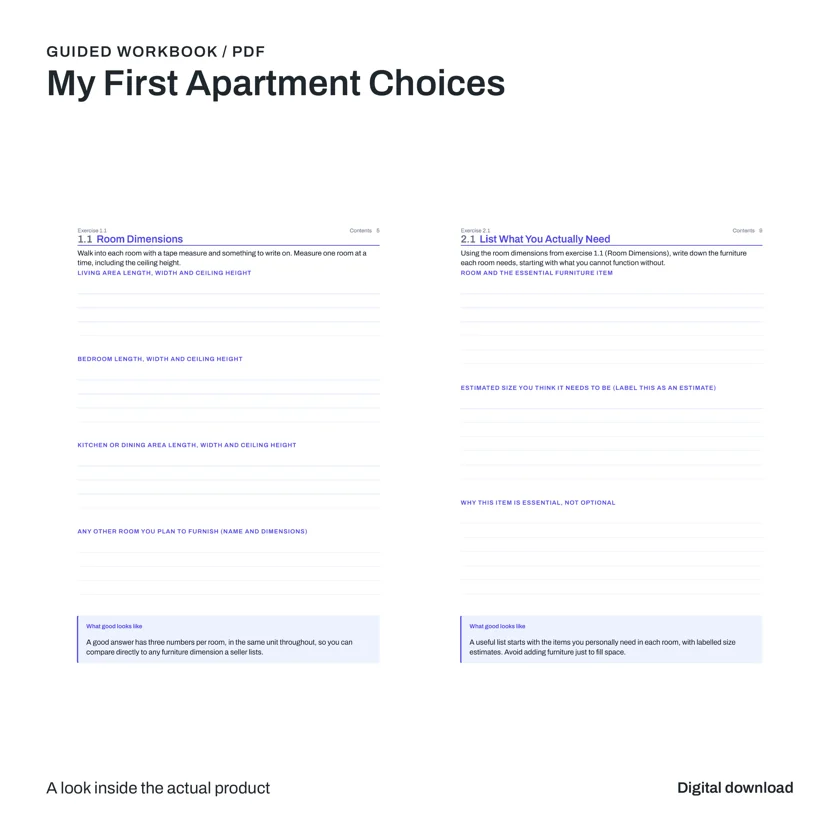
This suggests a practical standard for your own product: every page should have a job. A workbook can guide a decision. A planner can support a routine. A spreadsheet can calculate a result. Remove repetitive filler that adds page count without making the task easier.
Before writing the sales description, use the file yourself. Record the steps the buyer will take, the inputs they need, and the point where the task is complete. Those observations give you more precise listing copy than asking AI for a list of impressive-sounding benefits.
Organize the buyer download
A product package and a buyer download serve different purposes. Your production package may contain covers, mockups, social images, draft copy, and internal notes. The buyer usually needs the product itself and a short set of instructions.
first-apartment-workbook/
  START-HERE.pdf
  First-Apartment-Workbook.pdf

seller-assets/  ← keep separate from the buyer download
  cover-image.webp
  interior-preview.webp
  listing-copy.txt
This is an example folder structure, not a description of a fixed Stredy export. Check your actual manifest and rename files consistently. Remove obsolete versions, placeholder files, and personal information from sample entries.
Choose file types for the way people will use them
A PDF preserves page layout and suits printing or annotation. An EPUB can be more comfortable for a text-heavy ebook on a small screen because text reflows. Gumroad’s mobile-friendly file guide discusses PDF and EPUB support and recommends considering both for ebooks.
For spreadsheets, state the file type and the software you tested. An Excel workbook may behave differently after import into another application. Do not label it “Google Sheets compatible” until the important formulas, charts, validation rules, and instructions work there.
Write a short start-here page
Tell the buyer what to open first, what is included, and what they need to use it. Explain how to duplicate a spreadsheet before editing or how to select the correct print size for a PDF. Include a support contact you actually monitor and a version label so problems can be traced to the right file.
Gumroad requires the purchased content to be available to the buyer; a product with no content that simply tells buyers to message elsewhere is not an acceptable delivery method. Review its content restrictions as part of preparing the offer.
Write a listing that answers the buying questions
Your title should identify the product, intended use, and format where helpful. Keep the first paragraph specific. Someone arriving from an article, a social post, or an ad should understand what they receive without scrolling through a story about passive income.
First Apartment Planning Workbook — Printable PDF
Measure your rooms, identify the essentials, and decide what to buy first. This printable workbook gives first-time renters a structured place to compare needs before shopping.
Inside: room-measurement exercises, an essentials list, and space to explain your choices.
Format: PDF download. Print it or annotate it in a compatible PDF app. Check the supplied file for its exact paper size. No physical item is included.
That example deliberately avoids an unverified page count, universal app compatibility, and a promise to save a specific amount of money. Replace every detail with the facts of your own export. If a workbook contains no fillable fields, do not call it a fillable PDF.
Follow the description with a clear contents list, software requirements, usage instructions, and support information. Explain any limitations buyers need to know before purchasing. Avoid “lifetime updates” unless you have decided to make and maintain that commitment.
Plan a useful set of product images
Use coordinated colors, readable type, and a consistent layout. A cover establishes the identity. The remaining images should provide evidence that the product matches the description.
- Product overview: title, format, and a clear view of the product.
- Inside the download: actual pages or worksheet tabs with readable detail.
- What is included: verified sections and files, presented without clutter.
- How to use it: a simple sequence from opening the file to completing the task.
- Compatibility and requirements: supported software, printing information, and what is not supplied.
Mockups should contain the actual exported pages or screens. A realistic laptop scene is misleading if its spreadsheet has invented cells or charts. Treat props as illustration and clearly identify the offer as a digital download.
Create the product, then test it as a buyer
In Gumroad, begin from the Products dashboard and create the appropriate product. Add the buyer-facing content, description, images, and your chosen price. Review the current Gumroad fees before deciding whether the price supports your costs and the level of support you intend to provide.
If you use Stredy’s supported Gumroad connection, review the prepared store draft and its attached files before the final publishing decision. Your store is where you confirm the offer, price, settings, and customer-facing result.
Use Gumroad’s test-purchase guidance to inspect the buying experience. Follow the receipt or library route the customer will use. Download the delivered file, open it, and complete the first task. A successful upload alone does not verify the whole experience.
- The title and images describe the same product that is delivered.
- The receipt or content page leads to the expected files.
- ZIP files extract and PDFs open without missing pages.
- Instructions are readable on the devices you expect buyers to use.
- Spreadsheet example values can be cleared without breaking the formulas.
- The support link works and the product version is identifiable.
Connect the product to a realistic traffic plan
A store page gives people somewhere to buy. It does not establish that enough people will find or want the product. Pick one acquisition route for your first test: a useful search article, an existing audience, or a demonstration on a social platform.
For a reading planner, demonstrate filling in a week and reviewing what happened. For a workbook, show how one exercise supports the next. For a spreadsheet, show an input changing a result using clearly labeled example data. The demonstration should match the exact product in the listing.
Track visits and purchases separately. If few people arrive, work on distribution. If relevant visitors arrive but do not buy, investigate clarity, fit, preview quality, price, and trust. A small sample cannot establish a stable conversion rate, so avoid making a big decision from a handful of visits.
Common questions
Do I need an audience before I create a product?
You can build a first product before you have a large audience, but you still need a credible way to reach interested people. Identify where the intended buyers learn about the task and plan a helpful demonstration or article for that context.
Should I include editable source files?
Include them only if they are part of your intended offer, you can support their use, and you have the necessary rights. A finished PDF, an editable spreadsheet, and a design-source file are different deliverables. Describe them separately.
What does Stredy contribute?
Stredy brings product planning, writing, design, checks, and available sales assets into one workflow. It can help you prepare a package; you still review the files and your marketplace listing. See the creation workflow and supported formats before choosing your product.
Build the download your listing promises
Start with a focused audience and a useful outcome. Stredy helps turn that brief into a product package you can inspect and prepare for your store.
Start your product →View plans and monthly creditsHow this guide was prepared: AI-assisted writing checked against the linked official marketplace guidance and Stredy’s documented outputs. The featured image is AI-generated editorial artwork. Interior product samples show actual Stredy exports. Ideas and examples are illustrative; no sales results are claimed. Stredy publishes this guide and offers a paid product-creation service.