To create digital products with AI, start with a specific buyer and a useful outcome, then use AI to help plan, write, and design the files. Review the exported product in the software the buyer will use before preparing the listing. A polished draft is only one part of a finished download.
This workflow is for creators making planners, workbooks, guides, ebooks, and spreadsheets for individual buyers. It includes a reusable brief, format-specific checks, and examples from actual Stredy outputs. It does not assume that an AI-generated file is accurate, original, or ready to sell without review.
1. Write the buyer outcome before the prompt
“Make me a premium planner” leaves too much unresolved. It does not say who will use it, what they need to do, or what a successful page should help them accomplish. A specific brief gives both you and the AI a basis for judging the result.
- Audience
- Adults restarting a reading habit after a long break.
- Outcome
- Choose realistic reading time and reflect on what helped them keep it.
- Format
- PDF for printing or annotation in a compatible app.
- Core structure
- A short introduction, weekly planning pages, daily reflections, and a reading log.
- Design direction
- Calm colors, strong contrast, readable text, generous writing space.
- Boundaries
- No clinical claims, invented research, guaranteed outcomes, or untested app-compatibility claims.
- Completion check
- A reader can plan a week, record an entry, and understand how to use the next page.
Adapt every field to your idea. A travel guide needs different evidence from a reading log. A household spreadsheet needs explicit calculation rules. If you cannot explain how you will verify the promised result, simplify the product or choose a topic you know better.
You can compare the main Stredy product formats before committing to a brief. A format is a tool for the buyer’s task, not just a different-looking cover.
2. Collect enough evidence to build responsibly
Use AI to organize questions and summarize sources, but keep the source links. Check the original material before including a factual claim, statistic, quotation, or technical instruction. If a source cannot be found, remove the claim or replace it with a clearly labeled example.
For demand research, separate the topic from the product. A search estimate for “reading planner” does not prove demand for a particular layout, audience, or price. Look at buyer questions, competing products, and usability gaps. Write down the evidence you observed instead of asking AI to declare the niche profitable.
For product content, build a short fact ledger: claim, source, date checked, and where it appears. Keep fictional examples clearly labeled. Avoid adding health, legal, or financial recommendations merely to make a simple planner seem more substantial.
3. Approve a structure that supports the task
Review the outline before requesting the full product. This is an inexpensive place to catch missing steps, repetition, and a mismatch between audience and content. Change the blueprint while it is still short.
Planner
Orient the reader, give them places to plan and record, then add useful review prompts. Leave space to write.
Workbook
Explain the goal, show an example, ask for a meaningful response, then use that response in a later exercise.
Guide or ebook
Build coherent chapters from basic context to application. Include examples, boundaries, and a practical next step.
A spreadsheet needs a different outline: instructions, inputs, calculation rules, outputs, and test cases. Decide what happens with blank values, zero values, unusually large values, and an incomplete month. Those decisions belong in the design brief rather than being left to whatever formula the AI happens to produce.
4. Use design to explain the content
Choose a limited palette, a clear type hierarchy, and repeatable spacing. Use the same styles for the same roles across pages: heading, instruction, example, input, and callout. A coordinated theme helps readers understand the product without learning a new layout on every page.
Add visuals when they carry information. A process diagram can explain a sequence. An icon can make a recurring section easier to find. A labeled example can teach someone how to fill in a page. Avoid decorative charts that imply measured data where no data exists.
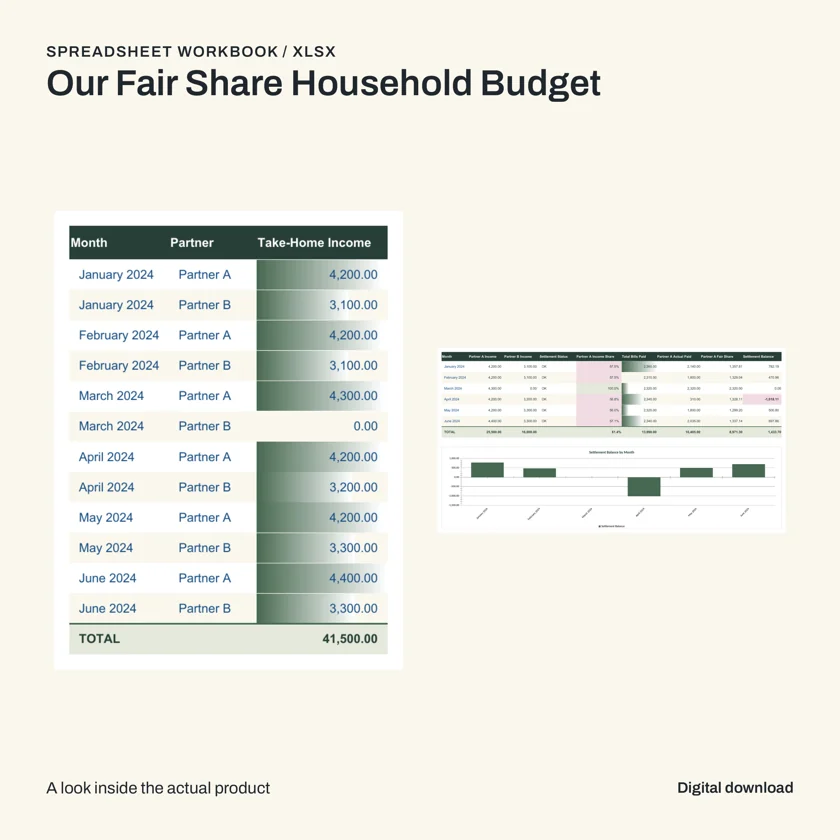
In the sample above, a table and chart serve a shared purpose: presenting entries and a summary. That is a stronger reason to include a chart than simply making a dashboard look advanced. For your own product, trace every chart back to its cells or source data and explain what it shows.
Check actual size as well as appearance. A PDF page can look elegant when enlarged on a monitor and become difficult to read when printed. A spreadsheet dashboard can look balanced with sample entries and collapse when a buyer adds a longer label.
5. Inspect the exported files, not only the preview
Open the final file. Exports can change fonts, line wrapping, links, page breaks, formulas, or image placement. A screenshot of an editor and an automated quality score cannot replace checking what the buyer receives.
| Format | Check directly | Useful test |
|---|---|---|
| Text size, page order, margins, writing space, links, missing images | Inspect every page; print a representative page at its intended size | |
| EPUB | Chapter navigation, text reflow, headings, image placement | Open in a compatible reader and change text size |
| XLSX | Instructions, inputs, formulas, charts, validation, error values | Enter known values and compare the result with a manual calculation |
| ZIP | File completeness, filenames, duplicates, extraction | Extract into a clean folder and follow the start-here instructions |
A small spreadsheet test you can repeat
Suppose your workbook splits a fictional $120 shared bill equally between two people. The expected share is $60 each. If one person paid the entire bill, the settlement should match the method your instructions describe. Next, test a blank entry, a zero bill, and a changed split. These are illustrative test values, not a report about the sample pictured above.
Keep a simple pass/fail note for each test. A failure should lead to a targeted repair: the formula, the instruction, or the relevant layout. Replacing the whole product can discard good work and introduce unrelated problems.
6. Control cost by reducing avoidable rework
Set scope before generation. Extra chapters, loosely related bonuses, and multiple competing design directions all create more material to produce and verify. A narrow complete product is easier to evaluate than a sprawling bundle.
- Resolve decisions early. Choose the audience, format, structure, and visual direction before the full build.
- Keep approved work. Repair a failed component using saved progress when the workflow supports it.
- Reuse design rules. A coordinated theme does not require inventing each page separately.
- Generate useful visuals. Prefer a relevant diagram or real product preview to several decorative images.
- Record actual usage. Compare the final cost and output quality rather than judging by token count alone.
In Stredy, review the credit reservation before starting and the final product charge in your library. Successful AI suggestions currently cost 17 credits; failed suggestions and failed product builds do not consume customer credits. Check current plans and allowances when choosing a subscription. Provider usage and customer credits are different measures.
7. Prepare the right package for the marketplace
Use actual exported pages in the sales assets. Keep titles readable, show a useful interior, and state the format plainly. The listing should describe the finished package, including any software requirements and features you have tested.
Etsy
Review the Creativity Standards, including disclosure for items created using AI and the exclusion of AI prompt bundles from designed-by-a-seller items. Package a product you created or designed and explain the role of AI honestly.
Gumroad
Attach the buyer’s content and provide clear instructions. A useful product page tells people what they receive and how to use it. Check Gumroad’s content restrictions before publishing.
Amazon KDP
KDP requires disclosure of AI-generated text, images, or translations; its policy distinguishes AI-generated from AI-assisted content. Read the current content guidelines. Writing-based products may be unsuitable for Kindle ebooks, so also check the Kindle quality guidance. Stredy prepares KDP packages only for eligible products, and you upload them manually.
Common questions
Can I sell a product made with AI?
That depends on the product, your rights to its contents, the tools’ terms, and the marketplace’s rules. AI use does not remove your responsibility to review the work or make required disclosures. Check the policy for your chosen destination.
Does a high quality score mean I can skip review?
No. Automated checks help identify problems but do not establish that every fact is correct or every task is useful. Test the exported file and compare it with the promise in your listing.
What should I do after generation?
Download the complete package, inspect the buyer files, review the sales assets, and store a backup. Stredy’s generated files remain available for seven days after completion; use the deadline shown in your library.
Put the workflow into practice
Bring one buyer, one problem, and one useful outcome. Review the blueprint in Stredy before the agents build the product and its available sales assets.
Create your product brief →See the four-step workflowHow this guide was prepared: AI-assisted writing checked against the linked official marketplace guidance and Stredy’s documented outputs. The featured image is AI-generated editorial artwork. Interior product samples show actual Stredy exports. Ideas and examples are illustrative; no sales results are claimed. Stredy publishes this guide and offers a paid product-creation service.